2025-11-30
Kafka topics to Iceberg Tables
In this post, we'll explore different approaches for ingesting Kafka data into Iceberg tables, examine strategies for managing schema evolution, and discuss when to choose one method over another based on your specific use case.
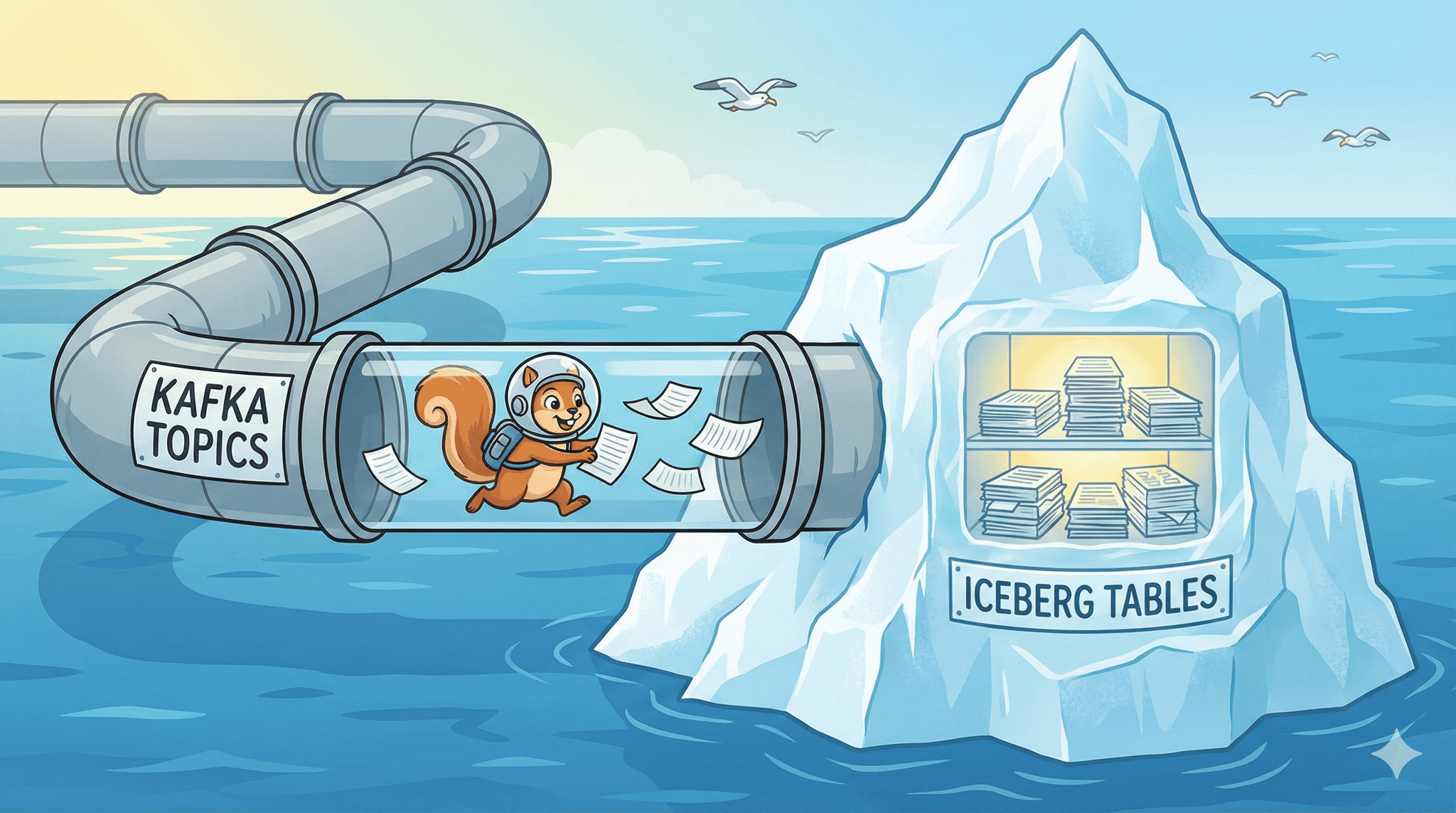
Kafka Topics to Iceberg Tables
Apache Kafka and Apache Iceberg have become foundational components in modern data architectures. While Kafka excels at streaming real-time data, Iceberg provides a robust table format for data lakes with ACID guarantees and time travel capabilities. Bridging these two technologies enables organizations to build reliable data pipelines that expose streaming data into queryable analytical tables.
However, writing Kafka topics to Iceberg tables introduces several challenges. How do you handle schema changes as your data evolves? What happens when multiple writers attempt to update the same table simultaneously? Which tools and frameworks offer the best balance of performance, reliability, and ease of use?
In this post, we'll explore different approaches for ingesting Kafka data into Iceberg tables, examine strategies for managing schema evolution, and discuss when to choose one method over another based on your specific use case.
Contents
- Why do we need to write Kafka topics to Iceberg tables?
- The Options on the table (pun intended)
- Handling Schema Evolution
- When to use what?
- Conclusion
Why do we need to write Kafka topics to Iceberg tables?
The question is not so much about Kafka or Iceberg specifically, but more about the need to move data from a streaming source to a structured analytical format. Kafka has been the de-facto standard for streaming data in a lot of organizations, while Iceberg has gained popularity as a data lake table format that supports ACID transactions, schema evolution, and time travel. Other streaming sources could be AWS Kinesis, Google Pub/Sub, Apache Pulsar etc., and other table formats could be Delta Lake, Apache Hudi. Since Kafka and Iceberg are widely adopted and there is a lot of tooling around them, this post will focus on these two technologies.
Kafka is great for real-time data ingestion and pub-sub messaging, but it lacks the capabilities needed for complex analytical queries.
There has been a movement in the industry towards writing/tiering Kafka topic segments as Iceberg tables, but I agree with Jack Vanlightly's perspective on this matter. You can read his excellent blog post here.
But what about Parquet? Why not just write Kafka topics to Parquet files? After all, most query engines support reading Parquet files and it is a widely adopted columnar storage format. And this would be fine for most cases. However, Iceberg is a table format that manages metadata, table snapshots, and ACID transactions. It works with file formats like Parquet, ORC, and Avro, and provides features such as:
- Atomic multi-file commits: Iceberg uses metadata files with atomic swaps to ensure that multiple files can be added or removed from a table in a single transaction i.e. either all changes are applied or none are.
- Schema evolution: Iceberg allows you to add, drop, rename and reorder columns without rewriting the entire table. It also supports schema versioning, so you can query data using different schema versions.
- Partition evolution: Iceberg allows you to change the partitioning scheme of a table without rewriting the entire table. It does this by maintaining a separate partition spec that maps data files to partitions. Storing this in the metadata allows Iceberg to evolve partitioning over time. If you were to use Parquet files directly, changing the partitioning scheme would require rewriting all the files.
- Time travel: Iceberg maintains a history of table snapshots, allowing you to query data as it existed at a specific point in time. This is useful for auditing, debugging and recovering from accidental deletions or updates.
- Improved performance: Iceberg optimizes data layout and file sizes for better query performance. For example, it can automatically compact small files into larger ones, reducing the number of files that need to be read during query execution.
- File level statistics: Iceberg maintains cross-file statistics such as min/max values, null counts and distinct counts for each column. This allows query engines to perform more efficient predicate pushdown and data skipping.
- Concurreny control: Parquet has suffered from issues when multiple writers attempt to write to the same file simulataneously. Iceberg's atomic commit protocol and optimistic concurrency control via atomic metadata swaps help mitigate these issues. This also means that readers always see a consistent snapshot of the table, even while writes are happening.
This is especially useful when writing streaming data, where data is continuously appended/upserted into the table. Often streaming data pipelines run into issues with multiple small files, schema changes, row-level updates/deletes and concurrent writes. Iceberg's features help address these challenges and make it easier to build reliable streaming data pipelines.
Seeing these benefits, many data teams and vendors are already building tooling around Kafka to Iceberg ingestion. We'll explore some of these options as well as hand-rolled solutions in the sections below.
The Options on the table (pun intended)
The way I see it, there are broadly three categories of tools that can be used to write Kafka topics to Iceberg tables:
- Stream Processing Frameworks: These are general-purpose stream processing frameworks that can read from Kafka and write to an Iceberg table. Examples include Apache Flink(DataStream and SQL), Apache Spark (Structured) Streaming and Apache Beam(via Google Dataflow). These frameworks provide a lot of flexibility and can be used to implement complex data processing logic. However, they also require more setup and maintenance compared to other options.
- Adapters/Connectors: These are specialized tools that are designed specifically for moving data from/to Kafka and sinks like Iceberg tables. Examples include Kafka Connect with the Iceberg Sink Connector.These tools are typically easier to set up and use compared to stream processing frameworks, but may not offer as much flexibility. There are also options like Flink CDC connectors that you can define declaritively in a yaml file and specify the source and sinks to create a pipeline. However, while it can currently only use Kafka as a sink and not as a source, it does support the Iceberg sink.
- Managed services: These are managed cloud-based services from a vendor that handle the ingestion of data from Kafka to Iceberg tables. These services handle the infrastructure and maintenance for you and provide a simple interface for configuring data pipelines. Some of them can also handle schema evolution and data quality checks out of the box. However, they may be more expensive compared to other options and may not offer as much control over the data processing logic. Example: Confluent Tableflow, Aiven Iceberg Topics, AutoMQ Table topics.
Each of these options has its own pros and cons, and the best choice will depend on your specific use case and requirements. In the next sections, we'll explore each of these options in more detail.
Stream Processing Frameworks
Apache Flink
DataStream API
Apache Flink is the de-facto standard for building real-time data pipelines. Many organizations use Flink for stateful stream processing, event-driven applications, and real-time analytics.
It has first-class support for both Kafka and Iceberg as it provides built-in connectors for reading from Kafka topics and writing to Iceberg tables. Flink's Table API and SQL support make it easy to define data transformations and write the results to Iceberg tables. Flink also supports exactly-once semantics, which is important for ensuring data consistency when writing to Iceberg tables.
To read from a Kafka topic, you can use the Kafka Connector.
A simple example would be:
1KafkaSource<RowData> source = KafkaSource.<RowData>builder()
2                .setBootstrapServers(kafkaBootstrapServers)
3                .setTopics(kafkaTopics)
4                .setGroupId(kafkaGroupId)
5                .setStartingOffsets(OffsetsInitializer.earliest())
6                .setValueOnlyDeserializer(new DebeziumJsonDeserializer())
7                .setProperty("enable.auto.commit", "false")
8                .setProperty(ConsumerConfig.ISOLATION_LEVEL_CONFIG, "read_committed")
9                .build();
10
11DataStream<RowData> sourceStream = env
12                .fromSource(source, WatermarkStrategy.noWatermarks(), "Kafka Source")
13                .uid("kafka-cdc-source")
14                .name("Debezium CDC Source");
I've written a more detailed post on using Flink to write CDC(change data capture) data from a Postgres database to an Iceberg table. You can read it here.
In this post, I use Debezium to capture changes from a Postgres table and write them to an Iceberg table. You can set the deserializer based on your Kafka message format. In production scenarios, the schema registry is often used to manage schema versions. Ideally, this schema would be part of your data contract with the upstream producer.
A common pattern is to cache the schema from the schema registry to avoid frequent calls to the registry. You can set a TTL for the cached schema to ensure that any schema changes are picked up after a certain interval.
It is also important to make sure you have the correct configuration in place for optimal performance and reliability. This includes setting the right checkpointing interval, state backend and parallelism. Checkpointing is crucial for fault tolerance when writing to Iceberg tables, as it ensures that the state of the Flink job is consistent with the data in the Iceberg table.
SQL API
Flink's SQL API provides a declarative way to define data transformations and write the results to Iceberg tables. You can create a Kafka source table and an Iceberg sink table using DDL statements (make sure you have all relevant JARs in path). For example:
1-- Create catalog for Iceberg
2CREATE CATALOG glue_catalog with (
3    'type' = 'iceberg',
4    'catalog-impl' = 'org.apache.iceberg.aws.glue.GlueCatalog',
5    'warehouse' = 's3://your-bucket/warehouse/'
6    'io-impl' = 'org.apache.iceberg.aws.s3.S3FileIO',
7    'glue.skip-archive' = 'true'
8);
9
10USE CATALOG glue_catalog;
11CREATE DATABASE IF NOT EXISTS kafka_iceberg_db;
12
13-- Create the Iceberg sink table
14CREATE TABLE kafka_iceberg_db.user_events_iceberg (
15    user_id BIGINT,
16    event_type STRING,
17    event_time TIMESTAMP(3),
18    properties MAP<STRING, STRING>
19) PARTITIONED BY (event_date);
20
21
22-- Create the Kafka source table
23CREATE TABLE kafka_iceberg_db.kafka_source (
24    user_id BIGINT,
25    event_type STRING,
26    event_time TIMESTAMP(3),
27    properties MAP<STRING, STRING>,
28    kafka_partition INT METADATA FROM 'partition' VIRTUAL, -- not included in sink schema
29    kafka_offset BIGINT METADATA FROM 'offset' VIRTUAL,
30    kafka_timestamp TIMESTAMP(3) METADATA FROM 'timestamp' VIRTUAL,
31    WATERMARK FOR event_time AS event_time - INTERVAL '20' SECOND
32) WITH (
33    'connector' = 'kafka',
34    'topic' = 'user_events_v1',
35    'properties.bootstrap.servers' = 'your_kafka_bootstrap_servers',
36    'properties.group.id' = 'your_consumer_group',
37    'scan.startup.mode' = 'earliest-offset',
38    'format' = 'json',
39    'json.ignore-parse-errors' = 'true'
40);
41
42-- Insert data from Kafka source to Iceberg sink
43INSERT INTO kafka_iceberg_db.user_events_iceberg
44SELECT
45    user_id,
46    event_type,
47    event_time,
48    properties
49FROM kafka_iceberg_db.kafka_source;
A common pattern most teams use in production is to have a staging Iceberg table where data is first written from Kafka. This staging table can have a more relaxed schema (for example, all fields as STRING type) to accommodate schema changes from the upstream producer. A separate process can then be used to validate and transform data from the staging table to the final target Iceberg table with the desired schema. To upsert data into the sink Iceberg table, you can set the flag for upsert mode in the Flink Iceberg sink connector.
1ALTER TABLE kafka_iceberg_db.user_events_iceberg SET (
2    'write.upsert.enabled' = 'true'
3);
In most data platforms I've seen, Flink SQL is wrapped in a template that uses the Flink Java API to submit jobs programmatically. This allows for better integration with orchestration tools and monitoring systems.
For more details, there is a wonderful article on Flink SQL and Iceberg by Robin Moffatt, here.
Apache Spark Streaming
Apache Spark is a de-facto batch processing framework used across multiple organizations. Many cloud providers offer managed Spark services like AWS EMR, Databricks, Google Dataproc etc. Spark structured streaming brings the dataframe API to stream processing, converting streaming computations into a series of incremental batch dataframe computations.
The major difference between Spark structured streaming and Flink is that Spark uses micro-batching to process a stream of data, while Flink processes it event by event (called Dataflow model). This means that Spark has higher latency compared to Flink, but can achieve higher throughput for certain workloads.
The process of reading from Kafka and writing to Iceberg tables is somewhat similar to Flink.
- Read from Kafka using the built-in Kafka source.
- Write to Iceberg using the sink provided by the Iceberg Spark runtime.
- Register the Iceberg catalog (Hadoop, Hive, Glue etc.) to manage Iceberg tables.
You must make sure you have the relevant Iceberg and Kafka JARs in your Spark classpath. Additionally, you may need to configure checkpointing to ensure fault tolerance when writing to Iceberg tables.
Here is an example of configuring the spark session for Iceberg and reading from Kafka:
1from pyspark.sql import SparkSession
2
3spark = SparkSession.builder \
4    .appName("KafkaToIceberg") \
5    .config("spark.jars.packages", "add relevant jars here for Spark SQL Kafka and Iceberg spark runtime") \
6    .config("spark.sql.catalog.glue_catalog", "org.apache.iceberg.spark.SparkCatalog") \
7    .config("spark.sql.catalog.glue_catalog.warehouse", "s3://your-bucket/warehouse/") \
8    .config("spark.sql.catalog.glue_catalog.catalog-impl", "org.apache.iceberg.aws.glue.GlueCatalog") \
9    .config("spark.sql.catalog.glue_catalog.io-impl", "org.apache.iceberg.aws.s3.S3FileIO") \
10    .config("spark.sql.extensions", "org.apache.iceberg.spark.extensions.IcebergSparkSessionExtensions") \
11    .config("spark.hadoop.fs.s3a.impl", "org.apache.hadoop.fs.s3a.S3AFileSystem") \
12    .config("spark.hadoop.fs.s3a.aws.credentials.provider", "com.amazonaws.auth.DefaultAWSCredentialsProviderChain") \
13    .getOrCreate()
To create a table in the glue catalog from Spark SQL:
1CREATE TABLE glue_catalog.kafka_iceberg_db.user_events_iceberg (
2    user_id BIGINT,
3    event_type STRING,
4    event_time TIMESTAMP,
5    properties MAP<STRING, STRING>
6) USING ICEBERG
7PARTITIONED BY (event_date)
8TBLPROPERTIES (
9    'write.upsert.enabled' = 'true',
10    'write.format.default' = 'parquet',
11    'write.parquet.compression-codec' = 'snappy',
12    'write.metadata.compression-codec' = 'gzip',
13    'commit.retry.num.retries' = '3',
14    'write.target-file-size-bytes' = '134217728'  -- 128 MB
15);
Batch Mode
You can then extract the Kafka data into a dataframe, optionally transform it, and write to the Iceberg table:
1import pyspark.sql.functions as f
2from pyspark.sql.types import StructType, StructField, StringType, MapType, LongType, TimestampType
3
4
5# read from Kafka
6df = spark.read \
7    .format("kafka") \
8    .option("kafka.bootstrap.servers", "your_kafka_bootstrap_servers") \
9    .option("subscribe", "user_events_v1") \
10    .option("startingOffsets", "earliest") \
11    .option("endingOffsets", "latest") \
12    .option("kafka.security.protocol", "SASL_SSL") \
13    .option("kafka.sasl.mechanism", "AWS_MSK_IAM") \
14    # additional options as needed
15    .load()
16
17payload_schema = StructType([
18    StructField("user_id", LongType(), True),
19    StructField("event_type", StringType(), True),
20    StructField("event_time", TimestampType(), True),
21    StructField("properties", MapType(StringType(), StringType()), True)
22])
23
24parsed_df = (
25    df.select(
26        f.col("key").cast("string").alias("kafka_key"),
27        f.from_json(f.col("value").cast("string"), payload_schema).alias("data"),
28        f.col("topic"),
29        f.col("partition"),
30        f.col("offset"),
31        f.col("timestamp").alias("kafka_timestamp")
32    ).select(
33        f.col("kafka_key"),
34        f.col("data.*"),
35        f.col("topic"),
36        f.col("partition"),
37        f.col("offset"),
38        f.col("kafka_timestamp")
39    )
40)
41
42# optionally create a staging table with relaxed schema to handle schema evolution
43final_df = parsed_df.withColumn("ingestion_time", f.current_timestamp())
44
45# write to iceberg
46final_df.write \
47    .format("iceberg") \
48    .mode("append") \
49    .save("glue_catalog.kafka_iceberg_db.user_events_iceberg")
Streaming Mode
To run this in streaming mode, we need to make a few changes to the above code. Instead of using spark.read, we use spark.readStream to read from Kafka. We also need to specify a checkpoint location to enable fault tolerance.
1streaming_df = spark.readStream \
2    .format("kafka") \
3    .option("kafka.bootstrap.servers", "your_kafka_bootstrap_servers") \
4    .option("subscribe", "user_events_v1") \
5    .option("startingOffsets", "latest") \
6    .option("maxOffsetsPerTrigger", "10000") \
7    .option("kafka.session.timeout.ms", "45000") \
8    .option("kafka.request.timeout.ms", "60000") \
9    .option("kafka.max.poll.records", "5000") \
10    .option("failOnDataLoss", "false") \
11    .option("kafka.security.protocol", "SASL_SSL") \
12    .option("kafka.sasl.mechanism", "AWS_MSK_IAM") \
13    # additional options as needed
14    .load()
15
16streaming_parsed_df = (
17    df.select(
18        f.col("key").cast("string").alias("kafka_key"),
19        f.from_json(f.col("value").cast("string"), payload_schema).alias("data"),
20        f.col("topic"),
21        f.col("partition"),
22        f.col("offset"),
23        f.col("timestamp").alias("kafka_timestamp")
24    ).select(
25        f.col("kafka_key"),
26        f.col("data.*"),
27        f.col("topic"),
28        f.col("partition"),
29        f.col("offset"),
30        f.col("kafka_timestamp")
31    )
32).withColumn("ingestion_time", f.current_timestamp())
33
34watermarked_df = streaming_parsed_df.withWatermark("event_time", "20 minutes")
35
36streaming_query = watermarked_df.writeStream \
37    .format("iceberg") \
38    .outputMode("append") \
39    .trigger(processingTime="30 seconds") \
40    .option("checkpointLocation", "s3://your-bucket/checkpoints/kafka_to_iceberg/") \
41    .option("fanout-enabled", "true") \
42    .option("path", "glue_catalog.kafka_iceberg_db.user_events_iceberg") \
43    .start()
44
45streaming_query.awaitTermination()
To process each micro-batch, you can additionally use the foreachBatch method to apply custom logic before writing to Iceberg.
A common pattern here is to use a staging table and then merge data into the final Iceberg table. This allows you to handle schema changes and data validation before writing to the final table.
1CREATE OR REPLACE TEMP VIEW deduplicated_events AS
2SELECT * FROM (
3SELECT
4    kafka_key,
5    user_id,
6    event_type,
7    event_time,
8    properties,
9    topic,
10    partition,
11    offset,
12    kafka_timestamp,
13    ROW_NUMBER() OVER (PARTITION BY kafka_key, user_id ORDER BY kafka_timestamp DESC) AS row_num
14FROM staging_table
15) WHERE row_num = 1;
16
17MERGE INTO glue_catalog.kafka_iceberg_db.user_events_iceberg AS target
18USING deduplicated_events AS source
19ON target.kafka_key = source.kafka_key
20    AND target.partition = source.partition
21    AND target.offset = source.offset
22WHEN NOT MATCHED THEN
23    INSERT (kafka_key, user_id, event_type, event_time, properties, topic, partition, offset, kafka_timestamp)
24    VALUES (source.kafka_key, source.user_id, source.event_type, source.event_time, source.properties, source.topic, source.partition, source.offset, source.kafka_timestamp);
At the beginning of this post, we discussed how streaming data pipelines often run into issues with multiple small files. Iceberg provides a way to compact small files into larger ones using the rewrite_data_files procedure. You can schedule this compaction job to run periodically to optimize the layout of your Iceberg tables.
1CALL glue_catalog.system.rewrite_data_files(
2    table => 'kafka_iceberg_db.user_events_iceberg',
3    strategy => 'binpack',
4    options => map(
5        'target-file-size-bytes', '134217728'  -- 128 MB
6        'min-input-files', '5',
7        'partial-progress.enabled', 'true'
8    )
9);
You can schedule this compaction periodically using a workflow orchestration tool like Apache Airflow or AWS Step Functions.
Alternately, you can trigger the compaction from within your codebase after a certain number of writes (ex. number of batches processed).
Similarly, you can also schedule the expire_snapshots procedure to clean up old snapshots and data files to save storage space.
Adapters/Connectors
Kafka Connect Iceberg Sink Connector
Kafka connect is a popular tool for moving data between Kafka and other external systems. It provides a simple way to set up data pipelines without writing any code. The Iceberg Sink Connector for Kafka Connect allows you to write data from Kafka topics directly to Iceberg tables. It also supports schema evolution and upserts.
Most organizations use Kafka Connect in distributed mode, where multiple worker nodes run the connectors and tasks. This provides scalability and fault tolerance for data pipelines.
While setting up a connector is easy, it does not provide stream processing capabilities like Flink or Spark.
The Iceberg Sink connector was originally created by Tabular which was later acquired by Databricks. It has since been donated to the Apache Iceberg project and is now maintained as part of the Iceberg codebase. You can find more details about the connector here. The underlying code for the connector can be found here.
Here is an example configuration for the Iceberg Sink connector:
1{
2    "name": "iceberg-sink-connector",
3    "config": {
4        "connector.class": "org.apache.iceberg.connect.IcebergSinkConnector",
5        "tasks.max": "4",
6        "topics": "user_events_v1",
7        // Deserialize messages
8        "key.converter": "io.confluent.connect.avro.AvroConverter", // or JSON converter: "io.confluent.connect.json.JsonConverter"
9        "key.converter.schema.registry.url": "http://schema-registry:8081",
10        "value.converter": "io.confluent.connect.avro.AvroConverter",
11        "value.converter.schema.registry.url": "http://schema-registry:8081",
12        // Iceberg specific configurations
13        "iceberg.catalog.warehouse": "s3://your-bucket/warehouse/",
14        "iceberg.catalog.catalog-impl": "org.apache.iceberg.aws.glue.GlueCatalog",
15        "iceberg.catalog.io-impl": "org.apache.iceberg.aws.s3.S3FileIO",
16        "iceberg.tables.auto-create-enabled": "true",
17        "iceberg.tables": "kafka_iceberg_db.user_events_iceberg",
18        "iceberg.tables.evolve-schema-enabled": "true",
19        "iceberg.tables.schema-case-insensitive": "true",
20        "iceberg.table.namespace": "kafka_iceberg_db",
21        "iceberg.table.default-partition-by": "days(event_time)",
22        "iceberg.tables.dynamic-enabled": "false",
23    }
24}
You can deploy this connector using the Kafka Connect REST API. Once deployed, the connector will start reading data from the specified Kafka topic and writing it to the Iceberg table.
For example:
1curl -X POST http://connect-worker:8083/connectors \
2    -H "Content-Type: application/json" \
3    -d @iceberg-sink-connector-config.json
The connector distributes the workload across multiple tasks where each task handles a subset of the Kafka topic partitions. Tasks operate independently and Kafka connect handles automatic rebalancing when new tasks are added or removed.
Note that more tasks = higher throughput, but only up to the number of partitions in the Kafka topic.
For a deep dive into using Kafka connect with Iceberg, you can read another excellent post by Robin Moffatt, here.
Flink CDC Iceberg Sink Connector
Flink CDC is a set of connectors that allow you to capture change data from various databases and stream it into sinks like Kafka, Iceberg etc. It is built on top of Apache Flink and provides a simple way to set up CDC pipelines without writing much code.
While it doesn't support Kafka as a source yet, it does simplify the CDC process from databases to Iceberg tables without Kafka in between.
I've played around with Flink CDC a bit but had some issues getting it to work. However, after a bit of digging, I managed to get a simple MySQL to Iceberg pipeline working.
In Flink CDC, you can define the source and sink connectors declaratively in a YAML file along with their configurations. You can optionally provide simple transformations. It's similar to how Kafka connect provides SMTs(single message transforms) to transform messages on the fly.
From their docs on the Iceberg sink, it supports auto-creation of tables and schema evolution.
A simple pipeline(from the docs) would look like this:
1source:
2    type: mysql
3    name: MYSQL_SOURCE
4    hostname: your_mysql_host
5    port: 3306
6    username: admin
7    password: your_password
8    tables: your_database.your_table # can specify a regex to capture multiple tables
9    server-id: 5401
10sink:
11    type: iceberg
12    name: ICEBERG_SINK
13    catalog.properties.type: hive
14    catalog.properties.warehouse: s3://your-bucket/warehouse/
15    # add more catalog properties as needed
16
17pipeline:
18    name: mysql-to-iceberg-pipeline
19    parallelism: 4
It would really help the community if the documentation was evolved to include production examples and gotchas. Let me know in the comments if you'd like me to write a detailed post on this.
An example reference from the Flink CDC docs:
Managed Services
Confluent Tableflow
Confluent is the company created by the original developers of Apache Kafka. Their platform that offers managed Kafka and related services is widely adopted across many organizations. Confluent Tableflow is a recent addition to their suite of services that allows their users to materialize Kafka topics into Iceberg or Delta Lake tables.
It automates many of the tasks involved in setting and managing an Iceberg ingestion pipeline, such as schema management, type conversions, compaction and expiration of old snapshots. Confluent takes care of the underlying infrastructure and maintenance, allowing users to focus on their data and analytics. It also integrates with multiple catalogs like Glue and Snowflake Open Catalog.
Users can also create streaming transformations using their Flink offering before writing to Iceberg tables via Tableflow.
Since it integrates with multiple catalogs, users can choose to read the Iceberg tables from different query engines like Trino, Athena or Snowflake. It also offers various networking options to connect to Confluent cloud securely via for example, a transit gateway or private link.
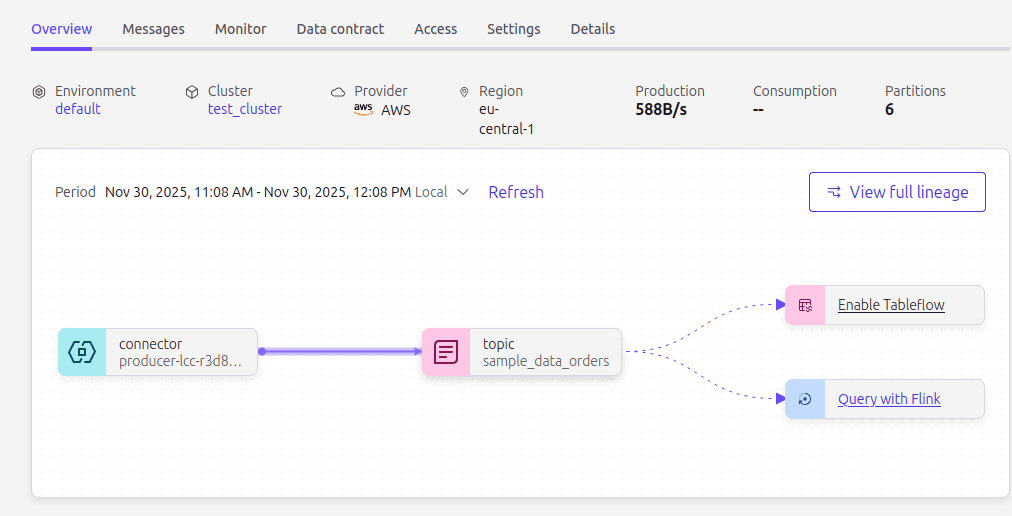
It's quite simple to set up a Tableflow job via their UI:
And them choose custom storage (S3) and the table format:
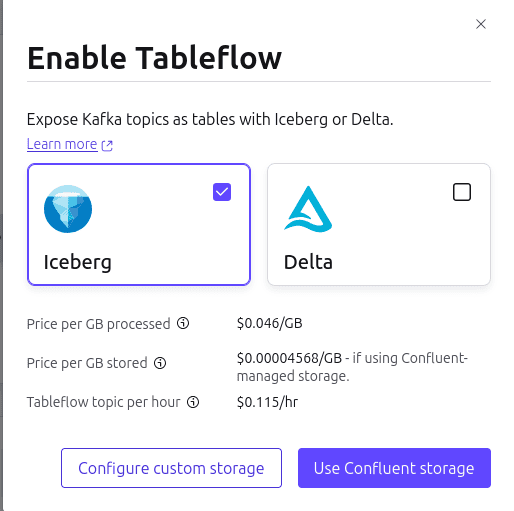
For setting up the S3 storage, you need provide the bucket name and the relevant IAM role that has access to the bucket. Tableflow will assume this role to write data to the Iceberg tables. Additionally, you can also create a separate role for Confluent to assume and manage Iceberg metadata in Glue.
AutoMQ Table Topics
AutoMQ is a fork of Apache Kafka that replaces its storage layer by offloading data to cloud object storage like AWS S3. It provides a complete Kafka compatible API while leveraging the scalability and cost-effectiveness of object storage.
I've only recently come across AutoMQ and haven't had a chance to try it out yet. However, from what I've read, it seems to be a promising solution for organizations looking to build scalable and cost-effective streaming data pipelines.
From the docs, it looks like it has a shared storage architecture with both WAL (write ahead log) and object storage. Since object storage offer lower IOPs compared to traditional disk storage, AutoMQ uses WAL to provide low-latency writes and reads. Data is asynchronously flushed from WAL to object storage in the background. It achieves this by replacing Kafka's native log storage with a custom streaming storage layer called S3Stream.
However, their open source version only supports S3 as the object storage.
From their docs:
It’s important to note that the open-source version of AutoMQ supports only S3-compatible storage services as WAL storage options. In contrast, the commercial version of AutoMQ offers different WAL options across various cloud providers to support a wider range of workloads.
You can read more about the architecture for S3Stream shared storage here.
The table topic is enabled via a simple configuration when creating a topic:
1topic_config = {
2    'automq.table.topic.enable': 'true',
3    'automq.table.topic.commit.interval.ms': '2000',
4    'automq.table.topic.schema.type': 'schema',
5    'automq.table.topic.upsert.enable': 'true',
6    'automq.table.topic.id.columns': '[event_id]',
7    'automq.table.topic.cdc.field': 'ops',
8    'automq.table.topic.partition.by': '[bucket(page_url, 5), hour(timestamp)]'
9}
Additionally, while initializing AutoMQ, you need to provide the relevant Iceberg catalog configurations:
1command:
2      - bash
3      - -c
4      - |
5        /opt/automq/kafka/bin/kafka-server-start.sh \
6        /opt/automq/kafka/config/kraft/server.properties \
7        --override cluster.id=$${CLUSTER_ID} \
8        --override node.id=0 \
9        --override controller.quorum.voters=0@automq:9093 \
10        --override controller.quorum.bootstrap.servers=automq:9093 \
11        --override listeners=PLAINTEXT://:9092,CONTROLLER://:9093 \
12        --override advertised.listeners=PLAINTEXT://automq:9092 \
13        --override s3.data.buckets='0@s3://automq-data?region=us-east-1&endpoint=http://minio:9000&pathStyle=true' \
14        --override s3.ops.buckets='1@s3://automq-ops?region=us-east-1&endpoint=http://minio:9000&pathStyle=true' \
15        --override s3.wal.path='0@s3://automq-data?region=us-east-1&endpoint=http://minio:9000&pathStyle=true' \
16        --override automq.table.topic.catalog.type=rest \
17        --override automq.table.topic.catalog.uri=http://rest:8181 \
18        --override automq.table.topic.catalog.warehouse=s3://warehouse/wh/ \
19        --override automq.table.topic.namespace=default \
20        --override automq.table.topic.schema.registry.url=http://schema-registry:8081
For a full example of trying it out locally using Docker, you can refer to their Github Example.
The table is created in the specified catalog and follows the naming convention, namespace.topic_name. For the example they've provided, this would be default.web_page_view_events. This can be consumed downstream using any query engine that supports Iceberg tables.
It looks relatively straightforward to setup and get started. However, it still doesn't offer the flexibility of enriching or processing the stream before writing to Iceberg tables like Flink or Spark would. All it does is write the Kafka topic data as-is to Iceberg tables. An ELT pipeline would still be needed to transform and clean the data before it can be used for analytics.
Handling Schema Evolution
As data evolves over time, it's extremely common for the schema of the data to change. This can happen due to various reasons such as new features being added, changes in business requirements or corrections to existing data. When dealing with streaming data from Kafka to Iceberg, it's important to have a strategy in place to handle schema evolution effectively. Schema evolution patterns vary based on the tool or framework being used.
This is a very broad topic that merits its own dedicated post. Let me know in the comments if you'd like me to write a detailed post on this.
Most organizations use a schema registry like Confluent Schema Registry or Apicurio to manage schema versions for Kafka topics. This allows producers and consumers to agree on a common schema and handle schema changes gracefully. When using a schema registry, it's important to ensure that the schema evolution rules are followed. For example, adding new fields should be done in a backward-compatible way, so that existing consumers can still read the data without issues.
With frameworks like Flink and Spark, one way is to fetch the latest schema from the schema registry, caching it locally to avoid frequent calls (by setting a TTL). This is then used to deserialize incoming messages. When a schema change is detected, the cached schema is updated and used for subsequent messages. Additionally, both Flink and Spark support schema evolution features in Iceberg, allowing you to add, drop or rename columns in the Iceberg table. Flink's DynamicIcebergSink is particularly interesting as it can automatically adapt to schema changes in the incoming data (Source).
Another way could be to have a staging Iceberg table with a relaxed schema (for example, all fields as STRING type) to accommodate schema changes from the upstream producer. A separate process can then be used to validate and transform data from the staging table to the final target Iceberg table with the desired schema. This fits the ELT paradigm where data is first loaded as-is and then transformed later.
When using Kafka Connect with the Iceberg Sink Connector, you can enable schema evolution by setting the iceberg.tables.evolve-schema-enabled configuration to true. This allows the connector to automatically update the Iceberg table schema when it detects changes in the Kafka topic schema.
For managed services like Confluent Tableflow, schema evolution is handled automatically by the service. Tableflow integrates with the schema registry and manages schema changes for you. It also provides options to configure how schema changes are handled, such as whether to allow incompatible changes or not.
To read more on schema evolution with Iceberg, you can refer to this section of the Iceberg documentation.
When to use what?
Choosing the right tool for writing Kafka topics to Iceberg tables comes down to a variety of factors:
- Current technology stack in your organization
- Team expertise and familiarity with tools/frameworks
- Latency SLA requirements
- Pipeline/transformation complexity
- Budget and resource constraints
- Operational overhead and maintenance (Infrastructure, monitoring etc.)
How the matrix looks, depends on your specific use case and requirements. However, here are some general guidelines to help you decide:
Apache Flink
- You need true low latency stream processing (sub seconds to seconds)
- Complex event processing, stateful computations or windowed aggregations are required
- You need exactly-once semantics for data consistency
- Your team/org has knowledge and experience with Flink
- Your organization has existing adjacent infrastructure to support Flink (Kubernetes, Observability, Orchestration etc.)
This comes with steeper learning curve, higher operational complexity and maintenance overhead (cluster management, job monitoring etc.)
Apache Spark Structured Streaming
- Your organization already uses Spark for batch processing
- You have moderate latency requirements (seconds to minutes)
- Your team already has SQL/Dataframe expertise
- You need integration with the Spark ecosystem (MLlib, GraphX etc.)
- You prefer a technology with a larger community and ecosystem
The cons here would be higher latency compared to Flink, challenges with exactly-once semantics in certain scenarios and operational overhead of managing Spark clusters.
Adapters/Connectors
This includes tools like Kafka Connect with the Iceberg Sink Connector or Flink CDC Iceberg Sink Connector.
- You have simple topic-to-table writes without complex transformations
- Latency requirements are not stringent (minutes or more)
- Your team/org already has a well established Kafka infrastructure
- Development and maintenance overhead needs to be minimal
- You want to quickly set up a pipeline without much custom code (declarative configuration)
The downsides are limited transformation capabilities, less control over data processing logic and potential throughput limitaions.
Managed Services
This includes services like Confluent Tableflow, Aiven Iceberg Topics, AutoMQ Table topics etc.
- You are already using a managed Kafka service (ex. Confluent Cloud, Aiven Kafka etc.)
- You need minimal operational overhead and maintenance
- Your use case is straightforward without complex transformations (table-to-topic writes)
- Your team lacks deep Flink/Spark expertise
- Budget allows for managed service costs
With this you get limited transformation capabilities, potential vendor lock-in, higher costs and less control over the underlying infrastructure.
Conclusion
Kafka and Iceberg are a powerful combination for building modern data platforms in various organizations. They provide a scalable and flexible way to enable real-time analytics and data processing. There are multiple ways to write Kafka topics to Iceberg tables, each with its own pros and cons. The choice of tool or framework depends on various factors such as latency requirements, transformation complexity, team expertise and operational overhead. By carefully evaluating these factors, you can choose the right tool for your specific use case and build a robust platform that meets your organization's needs.
Building modern data platforms with Kafka and Iceberg requires both technical expertise and the right team. At Unskew Data, I help start-ups and scale-ups architect and scale their data platforms with cutting-edge technologies like these. I also provide hiring advisory services to help companies build high-performing data engineering teams that can execute on their vision.
If you have any questions, corrections, feedback or suggestions, please reach out to me! I'd love to hear your thoughts and how you are using Kafka and Iceberg in your data platform.